Category: Blog

  • Fastcomet Vs Hostgator -An unbeaten Comparison

    While making a choice between two WordPress Hosts, it is imperative that we make it in an unbiased way. This article will be about FastComet vs HostGator – an unbiased comparison. At the end of the article, you will be able to make a decision about which host is better between the two.

    There are a few features that are crucial for any WordPress Host to be successful. Those are speed, security, customer support, migration, and ease of use. The performance of hosts on these categories, compared with the prices charged by them will show us which host is better.

    FastComet Hosting Overview:

    Rising from the most humble level, FastComet is a privately owned company with more than 70 employees and 11 data centers around the world. It is a host to 50,000 personal and business owner websites. FastComet was established in 2013 with its headquarters in San Francisco, California. FastComet has partnered with Linode, INAP, AMD, SpamExperts, CloudLinux, cPanel, Softaculous, Cloudflare, and many more such companies to provide high performing websites.

    HostGator Hosting Overview:

    HostGator was founded in Florida by Brent Oxley in 2002. The company started to flourish due to its awesome services. With over 500 employees till February and more recruitments going on, HostGator has become a leading company. It has since opened many offices for better management and started providing new services. Today HostGator offers numerous services to its clients including managed WordPress, Web Hosting, Cloud Hosting, etc.

    FastComet vs HostGator

    fastcomet-vs-hostgator

    Features

    To compare HostGator and FastComet, we will just focus on managed WordPress hosting to bring both companies on the same level. Let us now compare the features provided by both the companies to decide which one is a better WordPress Host.

    1. Speed

    FastComet offers SSD Cloud servers in multiple locations around the world. Compared to non-SSD hosting providers, access to your data is 300% faster. It also offers free Cloudflare CDNs so that your content is closer to the visitors of your websites and can be reached faster. FastComet offers its clients RocketBooster for boosting the speed of the websites for an extra cost.

    On the other hand, HostGator has servers only in the US. A super-charged cloud architecture, low-density servers, CDN, and multiple caching layers work together to give HostGator 2.5X speed.

    When both the companies are compared for speed, HostGator trumps the speed of FastComet. Hence, Hostgator earns a point here.

    • Security

     The servers on FastComet are protected by FastGuard that updates each server after a malicious attack on any one of them. The performance is improved and the attacks are averted. They offer Bruteforce protection for all the services.

    Daily malware scan, WordPress protection firewall, DDoS detection and mitigation, and IP Reputation botnet attacks filter are provided for security by FastComet. Free backups for 30 days as well as SSL certification are given as additional security features.

    HostGator gives iron-clad protection to your website from hackers, viruses, and malware by scanning your websites on a daily basis at the cloud level. HostGator gives the protection of CloudGuard which offers daily automatic backups, 3 restores per month, and unlimited database and files, for up to 5 websites.

    SSL certification is taken care of by HostGator to make your website trustworthy and ensuring secure transactions on it. Domain privacy is one more security feature offered to you by HostGator. This feature ensures you do not get spam mails, protection against Identity Theft, and protection of your private information.

    According to the data given both companies have implemented high-security measures. However, the security features of HostGator have far-reaching effects.

    • Customer Support

    FastComet provides customer support on the live chat which is available to anyone 24/7. It gives free migration of your data and websites to the FastComet platform.

    HostGator has 24/7 customer support live chat as well as phone helpline. It also has a wide knowledge base for the use of its clients. The response time of the support is very less. HostGator offers free migration to its new users but the number of websites migrated for free is limited as per the plan chosen.

    In this contest of FastComet vs HostGator, we will support HostGator because of its free migration.

    • Ease of Use

    FastComet allows you to access your accounts, domains, billing, or orders from any device at any time. The cPanel /WHM provided can be obtained in 29 different languages. You can install various CMS in just one click. The Observer Monitoring Dashboard allows you to view your stats in one place.

    HostGator has partnered with cPanel to offer better control to its users. HostGator concentrates on making hosting WordPress sites easier and simpler to manage. You can increase the capacity as your traffic rises with one-click scalability.

    In the comparison of ease to use, FastComet is better than HostGator and hence gets a point.

    • Pricing Plans

    FastComet and HostGator both offer a number of plans for their users. These plans differ in value and resources. Let us have a look at these plans to know which is more affordable.

    FastCometHostGator
    FastCloud Plan   Price: $2.95 per month Websites: 1 Disk Space: 15GB SSD space RAM: 2 GBStarter Plan:   Price: $5.95 per month Websites: 1 Disk Space: Unmetered Domain: Included for 1 year
    FastCloud Plus Plan:   Price: $4.45 per month Websites: Multiple Disk Space: 25GB SSD space RAM: 3 GBStandard Plan:   Price: $7.95 per month Websites: 2 Disk Space: Unmetered Domain: Included for 1 year
    FastCloud Extra Plan:   Price: $5.95 per month Websites: Multiple Disk Space: 35GB SSD space RAM: 6 GBBusiness Plan:   Price: $9.95 per month Websites: 3 Disk Space: Unmetered Domain: Included for 1 year

    While both FastComet and HostGator offer first-year plans at a discount, the second year prices are higher than that. Both the companies offer a 45-days money-back guarantee. FastComet offers $75 Grasshopper credit. HostGator additionally offers $100 Google Adwords credit and $100 Bing credit.

    HostGator looks cheaper on the first look because of all the free features offered. However, FastComet offer value-for-money. The features included are enough for a good managed WordPress Hosting.

    Conclusion:

    Conclusively, after the consideration of all the data regarding features and pricing, we think FastComet is better. It offers good returns for the payment you make. It also gives you good speed, security, and customer support. This makes us recommend FastComet over HostGator.
  • What is Link Building & the importance of link building in SEO

    Google’s algorithm has constantly evolved to improve search results. This makes it difficult for marketers and businesses trying to get their website ranked higher in SERPs (Search Engine Results Pages). It is no secret that link building plays an important role in SEO efforts, but many are beginning to debate how much of a part does this strategy plays? Some consider themselves lucky if they have good content on their site while others spend 80-90% of all marketing budget just focusing on link building alone! Everyone has different opinions with contrasting views. However, one thing we can agree upon is that linking strategies will always evolve along with Google’s ranking algorithms thereby making them even more crucial than ever.

    We will take you through everything you need to start link building.

    What is Link Building?

    Link building is having other websites link to your site in order to increase the rankings of that website.

    It is a common practice among businesses of all sizes, from tech startups to food bloggers.

    It is a popular strategy done by businesses big and small. When companies want to increase their market share, they often reach out to other websites for links with the hopes of increasing traffic and visibility online.

    Why is Link Building Important for SEO?

    Links are what make up the internet. However, it’s still not clear why they matter to Google.

    Well, if you were building a search engine then one of your biggest priorities would be tallying how popular websites are and finding an effective way to measure that popularity! The best time-tested method is by counting all of the votes each site has gotten from other sources.

    You can think of links as “votes” for your website. But all of your votes are not treated equally!

    How Important Are Links?

    Google confirmed that backlinks remain the #1 most important ranking factor in their latest Q&A. If you aren’t already, it’s time to start thinking about your link strategy!

    Not All Links Are Treated Equally

    How much it brings value if you create links in blogger, Tumblr, or in the world’s most popular social platform like Facebook. What if you create links in the comment section of a Time Magazine article.

    Google is becoming better at finding links that link to websites other than the companies themselves.

    We’ll go over all kinds of links and how they valued by google.

    Different Types of Links (3 Examples)

    We have divided into 3 categories of all links.

    The Natural Category of Links

    Natural links are ones that come from other sites automatically because they naturally want to link to your content. These can be called editorial links, and the simplest way is thinking of long-term value for what reasons you would get these types of links in the future.

    The Outreach Category of Links

    Outreach is when you ask others to link your site. The “outreach” category is asking people for links. You can ask them to do so either free of charge, or in exchange for money or some type of trading. This even includes the times you pay other people to acquire links on your behalf. This also includes times you hire others to do the work and acquire those links from other sites as well.

    The Self-Created Category of Links

    There are many kinds of links you can create yourself. The most popular style is local business citations, where you submit to many broad and niche directories. These links have a low barrier of entry so it means they hold less weight than the other strategies but are still useful for relevancy purposes which fall under best practice.

    Follow vs NoFollow Links

    When someone set a link on their website, it is dofollow by default. But they also have the option to set as “nofollow”.

    The “nofollow” link is an easy way for webmasters to say that they do not endorse a website. In theory, it avoids passing SEO value.

    DoFollow Links

    There are no “dofollow tags” or any kind of tag that can be used to create a dofollow link. Someone referred to a link as “dofollow” when they meant that it did not have the nofollow attribute.

    NoFollow Links. End of The World?

    A no follow link is a type of link that does not count as a point in the page’s favor, doesn’t boost PageRank, or helps with its search placement. It’s basically like saying “Don’t Love Me”.

    The sad existence of these links are created by an HTML tag called ‘nofollow’. This looks like: <a href=…’rel=’nofollow’>Link Text</a>. Essentially this says to Google and other Search Engines – don’t love me.

    Do Nofollow Links Matter?

    Think you have one site that has a few dofollow links. However, these are mostly from sites nobody’s heard about and the owner isn’t really an authority figure in their industry.

    Meanwhile, another website doesn’t have any do-followed link but was posted on Forbes and Entrepreneur.com.

    The second site is more authoritative because it has got links which are come from notable sources with plenty of credibilities.

    Google has the freedom to apply its own intelligence when judging nofollow links by not just ignoring all of them.

    Link Building Strategies

    You’ll learn several strategies that can be put into action today to start getting links in. One of the most popular and effective methods is outreach link building, where people prefer starting because it’s quick to see results.

    Guest Posting

    If you have the time, I recommend starting out doing guest posts. it’s easy to do because both parties benefit from a good relationship.

    At first, write some good quality article.

    A well-written article gets published on another site with backlinks that could help your own page rank for certain keywords in Google or even be used as evidence to show off your experience.

    Blogger Outreach

    Blogger outreach is a great way to get links back to your website without getting penalized by Google. Blogger outreach is exactly the same thing as guest blogging, from you reaching out to a site all the way publishing an article they wrote on their platform. The difference between both practices lies in that under blogger outreach there will not be any author bio or link pointing back at you other than linking it over.

    Niche Edits

    Niche edits are just as simple as reaching out to website owners in your industry and asking if they’d link to a relevant post of yours.

    Unfortunately, it has quite a low conversion rate during the first attempt.

    Skyscraper Outreach

    Brian Dean made popular the skyscraper outreach. This strategy is similar to niche edit. Where it differs is in the sites you reach out to.

    By using a backlink analysis tool, you can find a competitor’s article that meets these criteria:

    • Many dofollow links received by it
    • You can put together a better version of it

    After determining the value of your piece of content,  craft an email to convince people to link out to it. This is a variation on niche editing that could increase the conversion rate.

    Guestographic (Infographic) Outreach

    To up your outreach game, try guestographics. Find a relevant article and pitch an infographic to include in the piece along with showing how it will benefit readers of their site. Then offer writing some text describing your graphic as well.

    Content Syndication

    Syndicated content is when web-based articles are republished on a third-party website. It’s like doing business in that the website receiving this free content gets exposure while the creator of it receives backlinks to their site which boosts organic traffic for them as well.

    Syndication is not only beneficial for SEO, but it can also get your content more views by publishing on popular sites.

    Local Business Citations

    Citations offer both broad and targeted links through safety.

    Citation creation for local businesses is very important. If you’re new to this process of link-building it might be best to outsource the work rather than have no foundation at all.

    Citations are difficult. However, they can help bring targeted and broad links back on-site without much time requirement from the business owner itself-especially when outsourcing such tasks proves beneficial.

    Press Release Distribution

    The process of creating and distributing newsworthy announcements to journalists, online news outlets, or the press is called “press release distribution.”

    This method encourages journalists to come to your company. For this reason, it may be less labor-intensive too! With traditional methods, a reporter might ask you one question after another, but with this way, they do all the writing themselves–which means your time isn’t wasted on repeating yourself for different people.

    Link Building Metrics & Tools

    SEOs have three favorite link metrics that they use to adjust their websites. All of these help SEOs establish how well-linked a webpage is, but each metric calculates the value differently.

    Ahrefs

    The SEO tool Ahrefs is probably the most popular on the market. It has a large amount of backlink data, which can help you find those that other tools miss.

    Ahref’s two metrics are Domain Rank and URL rank, both ratings on a scale from 0 to 100 for how authoritative they judge websites or URLs as being.

    Domain Ranking (DR) measures an entire website based off their authority while URL Rating (UR) does this with specific webpages/URLs instead of whole sites.

    Moz (Formally SEO Moz)

    Moz is a powerful SEO tool that allows you to use their free tools which include the Open Site Explorer and Mozbar. Both allow for quick metric measurements of domains. Their Mozbar allows you to view metrics on authority-level sites which will help with your research projects.

    Moz’s metrics, Domain Authority(DA) and Page Authority(PA) are similar to Ahrefs’ but they use a different algorithm.

    You will see DA and PA referred to more in the SEO world as it is used by most websites when ranking their link authority.

    SEMRush

    SEMRush is the better option for paid traffic data, but Ahrefs has more backlink information which makes it a popular choice among SEO professionals. With both tools, you can pay $99/month to start. However, with SEMRush if have access to every feature that’s available while on Ahrefs there are some limitations based on how much money your company spends.

    Authority Score is a scoring metric of SEMRush.

    SEMRush created a single metric, instead of two metrics like Ahrefs and Moz. It’s a score between 1 and 100 that measures how strong backlinks are on a domain or URL.

    How To Track Link Building Success

    There are many ways to measure link-building success. Some people have their own metrics, while others value relevancy more than anything else.

    In order to track link building success, we suggest you monitor the following four metrics:

    • The volume of links which you are getting
    • From those website you are receiving links, the metrics of them
    • Your keyword ranking improvement
    • Groth of organic traffic

    Tracking your search engine ranking positions is probably the most common way to track SEO and link-building success. Here are a few reasons why:

    Higher Ranking on a search engine means more visibility, traffic, and better conversion rates

    Gaining or losing ranks can change drastically when you apply changes to your website model or receive links from other websites

    Positions may fluctuate throughout time because of these two factors alone.

    Summary

    The struggle of link building is real, but it’s all worth the effort in the end! It may be frustrating and difficult to get a good start at first. But you better believe that there will soon come along an opportunity for success if we stick with it!

  • What Are Backlinks? Best ways to get more links In 2021

    What Are Backlinks?

    A backlink is a hyperlink from another website to yours. Google uses these links as indicators of the relevance, authority, and validity of your sites on search engines like Bing or Yahoo!. You might hear the terms “incoming link” or “inbound link” used in place for “backlinks.”

    If you have a lot of high-quality backlinks coming into your site (such as Forbes), then it will rank higher than other websites that do not get this many incoming links – perhaps even page one!

    Backlinks are an important part of SEO. If you have backlinks from very low-authority sites, it could bury your site with Google ranking, and that’s not what we want! But don’t worry because there’s more to search engine optimization than just backlinking. You’ll need on-page activities too like keywords in the title or ensuring your website loads quickly for example.

    In this blog post, I will tell you why quality links matter so much and provide a step-by-step guide that tells you exactly how to make them happen – without being spammy about it!

    What does backlink look like?

    One great way to see the quality of a site is by checking its DA. Developed by Moz, Domain Authority is not a ranking factor but it might help your link-building strategy and provide an accurate assessment of web page content. You can check out websites with this extension called Mozbar from Moz which you can download for Chrome or Firefox browser

    Major Facts Of Backlinks

    • Wikipedia is the world’s most popular and widely-read single reference work on all topics. In 2007, it took a bold step in protecting its users by adding a no-follow attribute to all backlinks . This meant that links to third party sites would not count towards search engine rankings as before when they could make or break your company ranking online with just one link!
    • Google changed its blog comment spam policy in 2005
    • Google’s Penguin update to the SEO world was a game changer. The first time, Google penalized black-hat link schemes
    • After the introduction of USG (user generated) links, webmasters could tell if a link was for advertising or another perposes.

    Why Websites Need Backlinks

    Backlinks are a key strategy for every digital marketer because they provide an important boost to search engine rankings. Here are two key reasons for creating a backlink:

    To Improve Rankings on search results

    Backlinks act as a “vote of confidence” to let Google & other search engines know that users find the site.

    Google sees backlinks as one of its major ranking factors. Backlinks act as signals to Google that it offers users quality experiences.  So they will be increasingly important in our future with the latest update of google for page experience announced this May 2021.

    According to recent research, there is a number of backlinks and where it ranks on Google. by data, ranking highest has 3.8x more backlinks than positions 2-10!

    Moz scientist Dr. Matthew Peters recently showed that out of 200+ Google rank factors, 30% are explained by just one strategy: Backlinking!

    Google also favors anchors because it reveals the content. It’s important to pay attention to this detail since you’re more likely to get a favorable ranking by using relevant text with high-value keywords throughout your site.

    When it comes to search engine optimization, anchor texts can be the best way of describing a page.

    To Increase Discoverability on search engines

    As the number of searches increases, so does your audience.

    With 7 billion searches per day in 2020 and an ever-growing need to conduct business online, we are likely to see a higher volume of queries that result in new leads! This is why another way you can increase discoverability for your site is by building backlinks which will also lead to more referral traffic as well as provide enhanced benefits when ranking on search engines like Google or Bing.

    (Which traffic come via backlinks on third-party sites to your page is called referral traffic.)

    By strategically placing relevant links within posts on other, high-traffic websites, you’re making it easier for users to find your website.

    Types Of Backlinks

    The different types of links you can use to increase your website’s online visibility are nofollow and dofollow:

    More About Nofollow & Dofollow Links

    Building a great backlink strategy requires an understanding of nofollow and dofollow links. The difference between the two types is that one contributes to your page ranking whereas the other does not; Google, for instance, includes do-follow links as contributing factors in its PageRank system while nofollow backlinks not going to count as a signal of ranking factors as itself indicating search engines not to count it.

    Backlink Examples

    In order to maximize your search engine ranking, it is important that you use a variety of different types of links. Natural link signals like press releases and guest blogging can be used in conjunction with paid campaigns such as article advertising or web directories.

    Blogger Outreach

    Blogger outreach is also known as influencer marketing or guest posting.

    It is a way to reach out, collaborate with other website owners and offer them free content in exchange for some sort of mention or link back on their site. These links usually come from within topical posts they have written themselves.

    Do you want more exposure? Do so much work that people can’t help but talk about it! Bloggers are looking at guest posting as the next big thing – not only does it give your company name recognition but also offers juicy opportunities to expand its horizons through collaboration and new partnerships.

    .

    Niche Edits

    Niche edits is a backlink-building strategy that adds links to already published content. This added info will contain contextual links which can boost the site’s age and authority, increasing your chance for success with higher-quality backlinks in an extremely competitive industry landscape.

    Local Business Citations

    A local business citation is the mention of a company’s information on directories. Citations could also include the description of a business’ services; opening hours; driving directions to their location as well as taglines that provide further information about what they offer and alternative contact methods such as email addresses for customers who prefer more privacy when making inquiries. Google collects this data which it then uses in its ranking system.

    Proper citations can also help local businesses get discovered by new customers, which in turn brings more traffic and revenue. Tradespeople such as electricians, plumbers, painters for example could post their business information on high-authority sites like Yellowpages or Yelp while ensuring that the content is consistent across all channels to avoid any discrepancies from showing up when a customer checks out your services online.

    Press Release Distribution

    Press release distribution is an effective strategy for building brand authority and engagement with audiences. One way to do this is by distributing a press release about the benefits of your new product, which can include backlinks that direct readers to purchase or learn more about it. This helps increase organic traffic if you choose paid distribution as well since many media outlets will share these links in their own coverage on social media sites like Facebook or Twitter!

    Infographic Promotion

    When a business wants to promote themselves, they should consider creating an infographic. Infographics are visual representations that break down complex topics in simple ways and allow businesses with complicated industries such as software development or higher education to gain attention by presenting their information visually. They’re also shareable, which can create more natural backlinks for the company’s website when people reshare it on social media sites like Facebook or Twitter.

    How To Get Backlinks

    How many links do you need? How long does it take to get them? And what can be done in the meantime while we work on increasing our number of high-quality, relevant backlinks over time? Here is a breakdown:

    On average, 10-15 good-quality external links from authoritative sites will help your site rank higher than competitors with fewer or less relevant ones.

    Typically there are three ways to secure backlink:

    • Other site will link if you create original content
    • Site owners are likely to post your content and links if you  outreach manually.
    • You can use backlink services to make the whole thing easier by creating white-hat links on third party sites and boosting your search engine ranking in the process.

    We’ll take you through some of our favorite strategies for saving money. We’ll discuss different methods and compare the pros & cons.

    Earning Backlinks

    There are many ways of earning backlinks, but the best way is to create high-quality content that can naturally attract other websites. In general, Google considers this method preferable and it’s a little more difficult because you have to wait for domains from third parties before your site will get links in volume.

    This might be tricky if strong branding or quality isn’t enough, though sometimes these factors work just as well!

    Designing a creative infographic to go alongside your content can help you get backlinks. Not only does it make the information more interesting, but also increases its visibility by being seen and shared organically.

    Manual Outreach

    Manual outreach is an effective strategy for building links. Here’s how to do it:

    Research

    Research is crucial in the world of manual outreach. Usually, there will be several blogs related to your niche popping up when doing this research!

    When you will get a shortlist then focus on the quality of your backlinks which can make or break the success of a campaign. One way to determine if it will be worth your time is by looking at factors such as content depth, website traffic volume, domain authority and site relevancy.

  • How to Run a Guest Posting Campaign that Drives Traffic to Your Site

    The competition for page views has never been higher. While great content is still king when it comes to attracting website visitors, you will also need to develop a link building strategy if you want to reach your goals. 

    Guest posting for high authority sites is an effective and ethical method of growing your backlink profile. This, in turn, will improve your search rankings and drive traffic to your site.

    Read on to learn how to get those guest posting opportunities

    Know where you are

    A good SEO and link building strategy starts with understanding your baseline and competition. Checking your site’s performance and how it compares to other sites in your niche will give you an indication of what you’ll need to do to start ranking highly. 

    Begin by selecting the keywords you want to rank for, and use a Google search to discover the top ranking sites for those keywords. Compare your content with theirs. If their content is substantially better than yours, you might want to revise your content strategy before you focus on link building. 

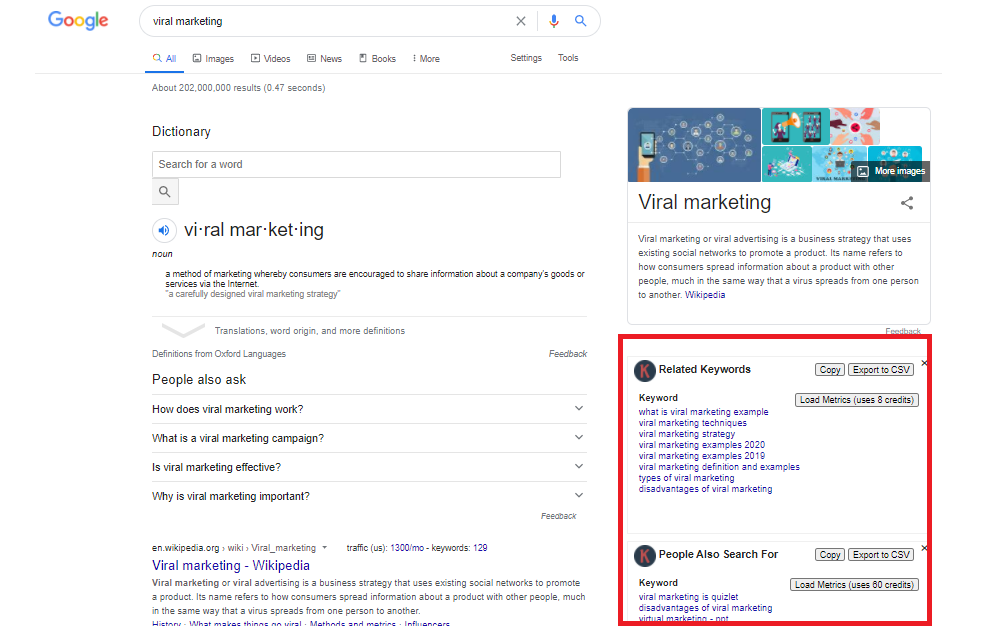
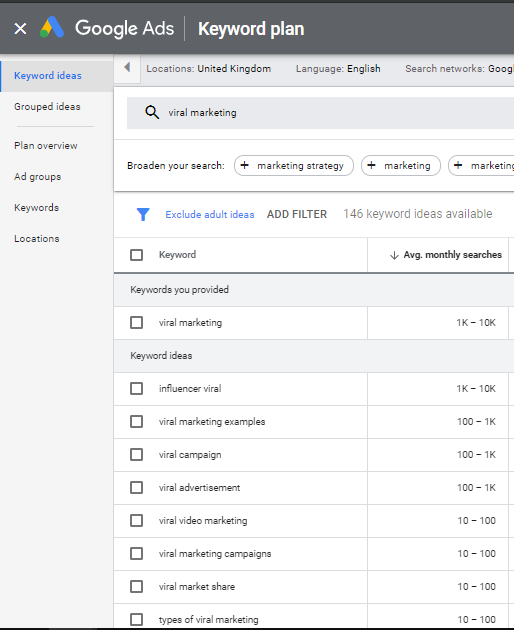
    Assuming you’re happy with your content’s quality, the next step is to find related keywords that you could also rank for. Google Keyword Planner will give you useful keyword suggestions. Here’s an example using the keyword “viral marketing”:

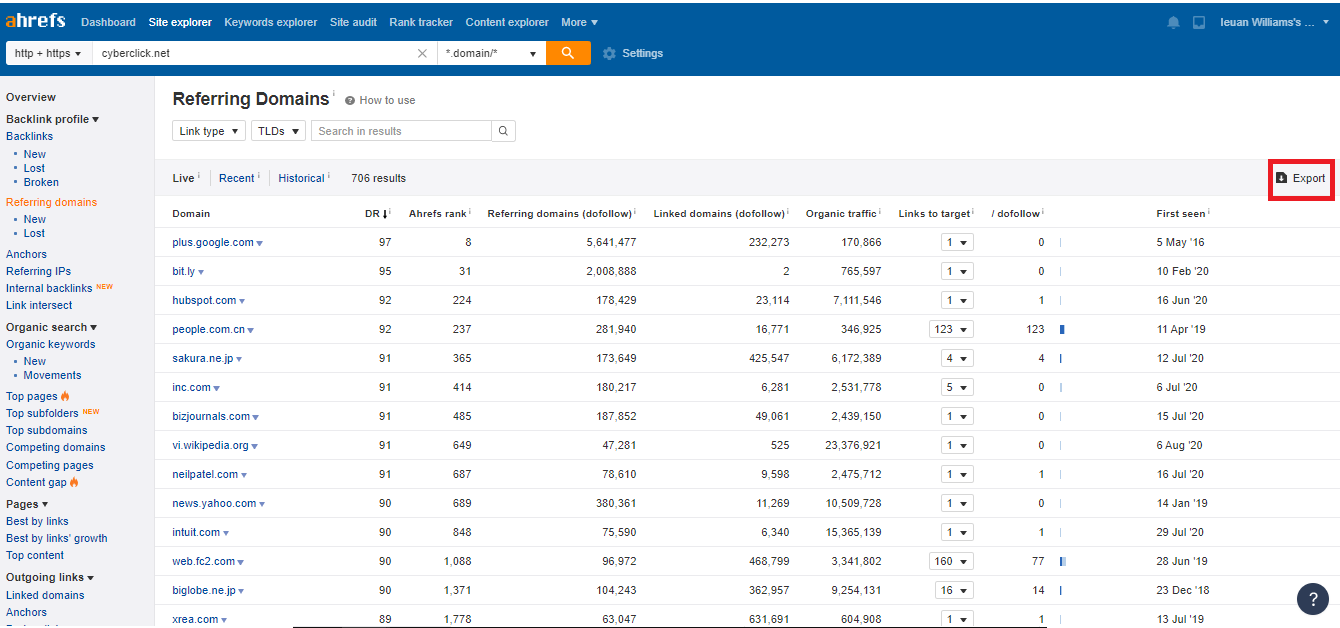
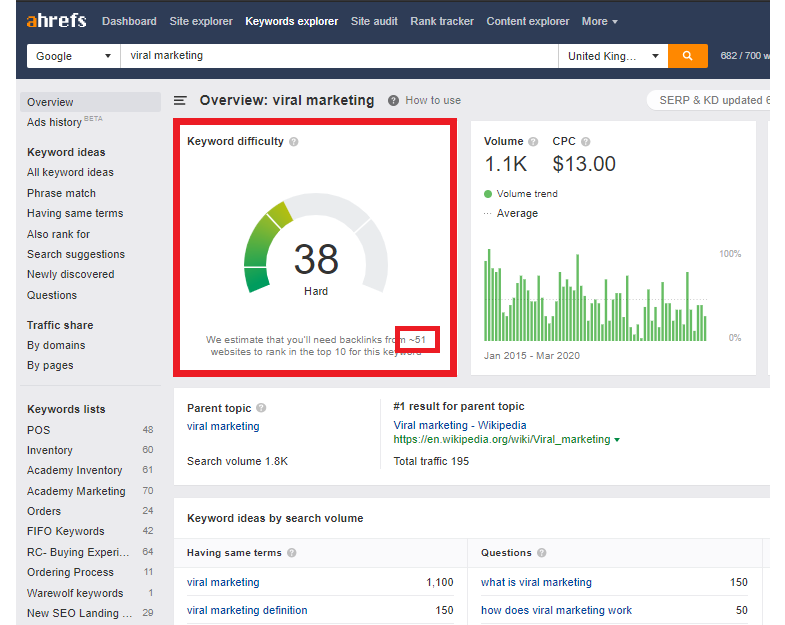
    Next, use a keyword checker tool like Ahrefs to discover the number of referring domains your site will need in order to rank on the first page of Google search results. Here’s where to find it:

    In this case, Ahrefs indicates you will need around 51 backlinks from high-authority sites to be in the top 10 results. That’s quite a lot, but not impossible! Use this figure to set an initial target number of guest posts. 

    Next, it’s time to start looking for websites to target. 

    Choose your target sites for guest posts 

    All backlinks do not have the same value. In fact, some can even harm your search rankings. You need to choose the right sites if you want your efforts to pay off. 

    Here are the criteria I use when I choose sites to target for guest posts: 

    • Must be relevant to my industry/niche. 
    • More than 3,000 visitors a month.
    • A Trust Flow score of 15 or higher
    • A Domain Authority (DR) score of 50 or higher.

    To find these sites, choose a high-ranking site similar to yours and use the Ahrefs backlink checker to review its backlink profile. You will get an exportable list like this: 

    Download the list, and then remove any sites that don’t meet the criteria listed above. You should also remove sites that are unsuitable for guest posts, like Facebook, Reddit, and Wikipedia. After all this filtering, you should still have several hundred sites to target. 

    Send cold emails to people in charge of content

    The next step is to find the right person to contact for each site and introduce yourself.

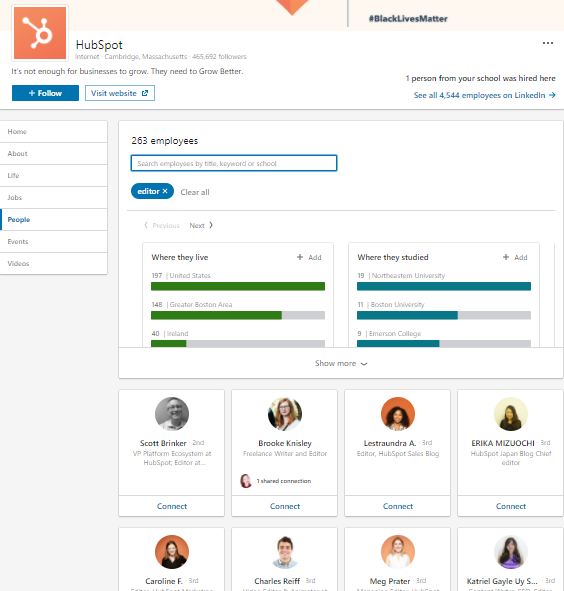
    If you don’t know who’s in charge of content for a specific site, go to LinkedIn and search for the company. You can then filter the people affiliated with that company according to their position. Search for job titles like “content manager”, “marketing manager”, or “editor”.

    Many LinkedIn users list their email address in their profile. If the person you’re targeting doesn’t, you can use an email lookup tool like Email Finder,Voila Norbert or FindEmails. 

    Once you’ve found the contact details, you can start sending outreach emails. Don’t get hung up on the fear of rejection – it’s an inevitable part of the process. In the next section, we’ll look at how to craft the perfect outreach email. 

    Write inviting subject lines 

    Website editors receive hundreds of emails each day. Therefore, you need to catch their attention with a subject line that entices them to open and read your email.

    Here are some useful tips for great subject lines:

    • Keep it simple and brief.
    • Use the editor’s or website’s name. Personalization boosts open rate to around 21%, up from the 14% for non-personalized emails. 
    • Use emojis (they can boost your open rate by up to 56%!)

    Subject lines aren’t an exact science, so try out a few different combinations until you find one or two that work for you.

    Use engaging email outreach templates

    Your email should be polite and friendly, but brief and to the point. 

    Skip the flattery about how amazing you think their work is. It’s really transparent and it doesn’t work. Instead, treat your outreach email like a business proposal – which it is! 

    Here’s a simple formula for a guest post outreach email: 

    • A friendly greeting using their name. 
    • Introduce yourself, your business, and what you do. 
    • Let them know what you’re asking for (a guest post spot on their site). 
    • Make your offer (free high-quality content).
    • Thank them for their time and use a friendly sign-off. 

    If you’ve already published guest posts elsewhere or are recognized as an expert in your niche, say so. Social proof is a useful currency when it comes to establishing a digital presence

    If you don’t hear back from them after a few days, send a polite follow-up email. If you still don’t get a response, you could safely assume they’re not interested, cross them off your list, and move on.

    Once an editor replies and says that they are open to guest posts, it’s time to come up with and pitch some specific article ideas. 

    Create a list of guest post topics

    Let me tell you a secret that many writers forget: there is nothing truly original to write about, unless you’re sharing cutting-edge research or breaking news. Don’t be afraid of covering topics that have been written about before. 

    The secret is perspective. You can always find a new angle from which to approach the subject. For example, if the blog has already covered viral marketing for big business, you might offer to write about viral marketing for nonprofits. As long as your angle is relevant to the site’s audience, go ahead and pitch it. 

    Short on inspiration? Do a Google search for your subject area and use the content you find as inspiration. You can also use the Keywords Everywhere browser plug-in, which gives you keyword suggestions related to your desired topic:

    Choose a few keywords from the list, then use the search string “site:sitename.com keyword” to check whether your target site already has content about the topic:

    If the site has already published content about the topic, either come up with a sufficiently new angle or move on to your next idea.

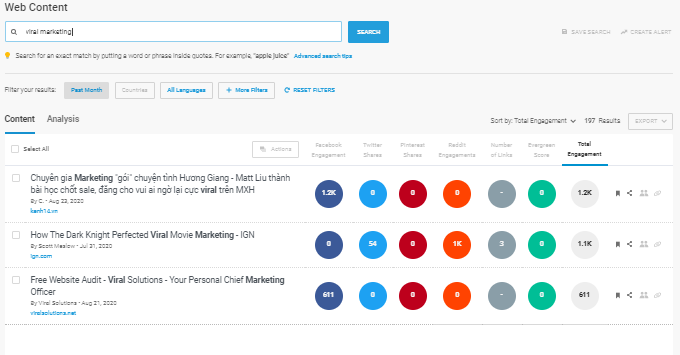
    If you want to see how other sites have approached a topic, use BuzzSumo. This useful tool will show you the top content for your chosen keyword based on social media engagement:

    Check out the trending content, then look to see whether your target site has already published something similar. If not, put that idea on your list. 

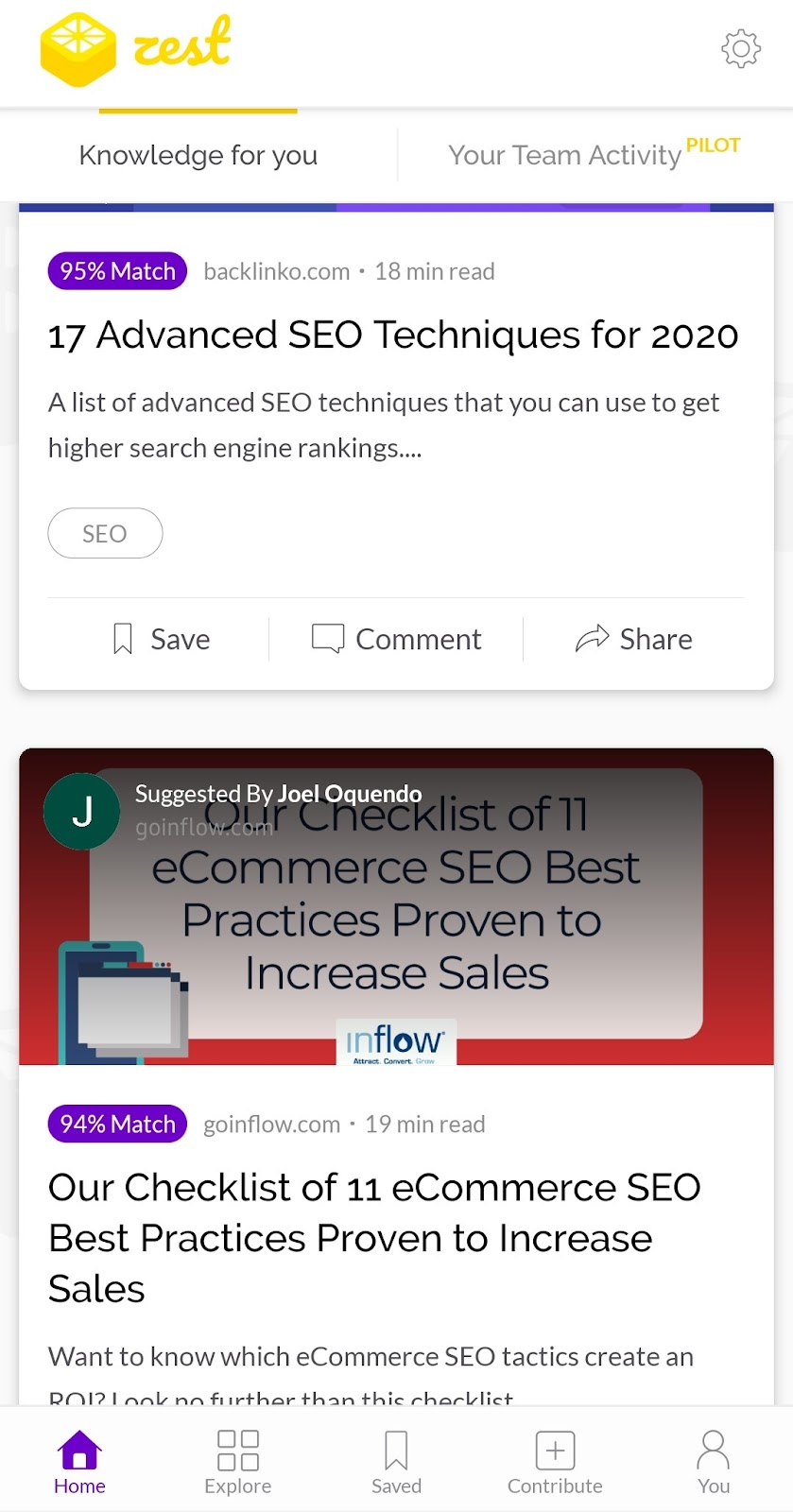
    Zest is another useful app you can use to find the freshest content in your niche. Zest rates articles sends you daily recommended content according to the interests you specify: 

    Doing your research will pay off. Send 2 – 3 well-researched topic suggestions to the editor within 48 hours of receiving their initial reply. 

    If they don’t accept any of your ideas, don’t despair – it’s not the end! Instead, take it as a cue to take a second look at the website and align your new ideas more closely with its topics and tone. Most editors will give you a second chance to pitch, so don’t give up. 

    Write your guest post content

    Did the editor approve your pitch? If so, congratulations! Now the real work begins. You need to create a fantastic piece of content that delivers the value you promised. v

    Here are my top tops for writing an awesome guest post:

    • Create an outline of the content before you start writing.
    • Follow the website’s style guide, if they have one. If not, read other posts on the site and match your tone and vocabulary with them. 
    • Fact-check everything rigorously. 
    • Check for typos and grammatical errors. A tool like Grammarly will catch any issues. 
    • Ensure you’re providing relevant information and actionable advice in every section. 
    • Never plagiarize content. If you use someone else’s data or ideas, always cite your sources.

    Since you’re doing guest posts to build links to your site, add one or two relevant links within your content. Resist the temptation to cram in as many backlinks as you can! This will annoy the editor and come across as spammy. 

    If the editor gives you a deadline for your guest post, deliver it on time or early. If you need more time, let them know as soon as possible. Most editors will happily grant an extension, but they will be annoyed if you don’t give them as much warning as you can. 

    One more tip: when you deliver your post, thank the editor for the opportunity. There is more to guest posting than just backlink building. It’s also a great way to build relationships with other people in your industry. Politeness goes a long way. 

    Drive traffic to your site through guest posts

    The success of your site depends on your search result rankings. If your site ranks highly for the right keywords, your target audience will find you.

    Building links from authority sites is the best way to improve your search result rankings. Guest posting will help you get the links you need and reach a broader audience. Guest posts are an essential part of a robust content marketing strategy. 

    Remember the most important rules of guest posting: 

    • Target sites in your niche that have a high domain authority, strong trust flow, and large number of visitors. 
    • Send a compelling, brief, and courteous email to the site owner or editor.
    • Choose topics that are relevant to your niche and the website audience. Offer a fresh perspective. 
    • Write readable and informative content that offers value to the reader. 

    As you publish more guest posts, your site’s ranking will improve. In addition, a track record of publication means that more opportunities will open up. If you’re struggling to write all those guest posts yourself, consider hiring a freelance writer or working with a content generation company. 

    As with all marketing efforts, you need to be strategic with your guest posting campaign. You’ll need to work hard and be patient, as it’s not an overnight winner. But as long as you persevere, you’ll start seeing the results. Wishing you the best of luck with your guest posting campaign!

  • The List of Best VPS Hosting Providers of India

    Selecting the best hosting provider of your website is a tough work. You may feel stressed, confused and somewhat lost while deciding about your web hosting provider. Though you have experience, it can still be hard to search for the best web host.

    Coming to the point, you have been using shared hosting since a long time and since your business starting growing you have outgrown your shared server. Now, you are looking to upgrade your shared hosting plan. Most of the users switch to VPS hosting after shared hosting. But you might think that why should you switch to VPS? Here’s the answer to your query.solution

    VPS (Virtual Private Server) is a higher in almost everything in terms of technology. Cheap VPS servers are actually similar to shared servers technically but the resources and users are isolated from others.

    The major difference lies in the division of resources. There are few users on the VPS servers and use the same hardware and each of them has its own ‘private’ environment which seems to appear their own server.

    Today, almost all hosting companies offer a VPS hosting. Below is a list of 5 best VPS hosting providers of India.

    AccuWeb Hosting

    Are you looking to buy a reliable hosting service for your website but having issues with the budget? Then, AccuWeb Hosting is the right place for you. Since its establishment in 2003, AccuWeb Hosting has been offering its most reliable hosting services at a very reasonable price to its global clients. With over 101,025 global clients and counting. We provide 15+ server locations. AccuWeb Hosting is a leading industry web hosting provider with 19 years of experience. So, whether you are a blogger or own a multi-complex e-commerce website, AccuWeb Hosting has got you covered. 

    AccuWebHosting provides one of the fastest and most scalable VPS hosting on the Internet. Whether you are just starting a new website or deploying a complex system, AccuWebHosting’s VPS Hosting solution is a solid option that makes everything even simpler and easier for you. Select your VPS plan with SAN, SSD, or Cloud storage.

    Fully managed VPS hosting:

    AccuWeb Hosting offers Fully Managed VPS hosting plans based on Linux and Windows infrastructure. All their VPS hosting plans come with SSD storage and high-performance CPUs. In addition, each VPS hosting plan offers you to select the control panel of your choice.

    Let’s dive into this AccuWeb’s VPS Hosting Review:

    Other features of VPS Hosting:

    • Ultra-Fast Managed & Secure
    • Full Root Access with a dedicated IP address
    • 99.9% Uptime
    • 24/7 Live Chat support and TIcket support
    • 7 Days Money Back Guarantee
    • Hassle-Free Cancellation
    • Weekly Backups
    • Raid Architecture
    • One-click application installation
    • 24/7 security monitoring and DDoS protection

    Their highly trained technicians are available 24/7/365 via the live chat option. Certainly, you will be surely delighted with the after-sale support.

    If you are busy and can’t go for a live chat? No worries. Submit your issue via the ticket system. their team replies to all tickets in a maximum of 30 minutes.

    You can also reach them via call for any quick guidance or sales inquiries. Their senior technicians will tackle your inquiry via calls.

    MilesWeb

    MilesWeb was started in 2012 and ranks as one of the best web hosting providers of India. The company aims at offering all the significant features at an affordable pricing. They offer all types of web hosting plans such as shared, dedicated, reseller, Linux and Windows VPS, WordPress and cloud hosting. They cater over 20,000 customers with their service today.

    Managed VPS Hosting Plans

    MilesWeb offers managed VPS hosting plans based on cloud infrastructure and powered by KVM hypervisor. All their VPS hosting plans come with SSD storage and high performance Intel CPUs. You can migrate your website to their VPS at any time you want to and free of cost.

    You can select your own control panel from Webuzo, cPanel and Plesk to manage your websites, emails, databases and much more.      

    Other Features

    • Solid-State Drives
    • Free VPS Management
    • SSH and Root Access
    • Resource Monitoring Dashboard
    • Host Unlimited Sites
    • Instant Provisioning
    • No Setup Fee
    • Robust Infrastructure

    They have a customer support team that is available 24/7 to help their customers with the queries and find a solution to them. Since they offer managed VPS hosting plans they take all the responsibility of your server management allowing you to work on your business growth.

    HostingRaja

    Standing as one of the best VPS hosting providers of India, HostingRaja offers the high performing VPS servers configured with enhanced technology and best virtualization platforms like KVM for Linux. With their years of experience, they have offered expertized security solutions to their customers. They ensure your website is optimized so that you can focus on your business.

    Managed VPS Hosting Plans

    They also offer managed VPS hosting plans that offer performance-tuned cloud servers. You can migrate your website to their servers without paying anything extra. They optimize your website for free to provide better speed and better sales.

    Other Features

    • Fully Managed VPS
    • Free SSL certificate
    • Service Level Agreement
    • SSD Drives
    • Root SSH Access
    • Free Backup and Restore
    • Control Panel

    They offer 99.99% uptime guarantee and 24/7 Support via phone, email and ticket system.

    BigRock

    Established in India and currently a part for EIG company, BigRock helps businesses to create their online presence. They are also popular globally and have their offices based globally. They offer web hosting solutions that are low cost. Their range of hosting solutions comprise of shared, VPS, reseller, cloud, SiteLock, domain name registration services and backup solutions.

    Managed VPS Hosting Plans

    BigRock offers managed VPS hosting plans for high performing websites and applications with the state of the art VPS servers. They setup your server instantly. You have the freedom to choose operating system and management panel.

    Other Features

    • Full Root Access
    • High-speed SSD Storage
    • VNC Access
    • WHMCS
    • DDOS Protection
    • Cutting – edge infrastructure
    • Private Network

    Their support team is always available and helps you in booting, logging in, investigating network/hardware related issues, initial module installation, etc. They are easily available via phone, live chat and email.

    HostGator

    One of the biggest hosting companies around, HostGator was started in 2003. They offer a wide range of hosting solutions such as shared, managed WordPress, VPS solutions, and dedicated servers. They offer support for SSL certificates, automatic backups, SpamAssasin for email protection, website backup and restore and more.

    Managed VPS Hosting Plans

    Features

    • Full Root Access
    • Free Website Migration
    • Integrated cPanel
    • Near-instant Provisioning
    • Guaranteed Resources
    • Secure Environment
    • SSD Storage
    • DDoS protection
    • Free Dedicated IP

    HostGator offers support in booting, networking, hardware issues, investigating hacking attempts, rebuilding servers, etc. Their team is available 24/7 via email, live chat and phone to help their customers.

    BlueHost

    One of the oldest web hosts in the industry, Bluehost offers a wide variety of hosting plans to all. They are a part of EIG company and have been headquartered in Utah. They have presence globally. They offer different types of hosting solutions such as shared, VPS, dedicated, WordPress and ecommerce hosting.

    VPS Hosting Plans

    Features

    • Free Domain Name for 1st Year
    • Free SSL Certificate
    • Root Access
    • OpenStack and KVM
    • Instant Provisioning
    • Guaranteed Resources
    • Enhanced Control Panel
    • Multi-Server Management
    • Access Control
    • File Management
    • Additional Resources
    • Domain Privacy
    • SiteLock

    They also offer round the clockcustomer support and 30 day money back guarantee.

    Conclusion

    This list of best VPS providers of India will surely help to find the best one for your website. But MilesWeb is highly recommended because their VPS is based on cloud infrastructure and also, cater your website with all the high performance features.

    Moreover, they have their headquarters in India and are an independent web hosting company. You can compare their reviews and then make a decision.

  • 4 best cloud services for small online business

    In today’s date, online presence has become essential for a successful business. Now that people are avoiding a visit to brick and mortar stores due to Coronavirus outbreak, it is the online businesses that are gaining more prominence in the market. If you are also running a small business, you need to put it online. And for that, you will need a cloud hosting provider. Let’s talk about Best Cloud Services for Small Online Businesses

    cloud hosting

    Image Source: Pixabay.com

    A cloud service provider or cloud hosting company offers a certain amount of server space to clients for storing and sharing data. These clients are small businesses like yours. The cloud servers not only allow you to operate your business online. Offering flexibility, scalability, better security, cost-efficiency, and a lot of other features.

    From the biggest companies like Facebook and Netflix to every online platform uses cloud hosting services. If you are a bit clueless about which cloud service provider will be ideal for your business, this blog can help you find one.

    1. Amazon Web Services (AWS):

    Amazon is one of the biggest companies in the world right now. Among the successful subsidiaries of this company, Amazon Web Services (AWS) gets a special mention. It is one of the fastest-growing cloud platforms in the world. In fact, 90% of the public cloud in the world is covered by AWS. Some of its highlighting features are:

    • Offers free sign up, and you can use the services free for the first year under the free tier usage.
    • It has multiple layers of security for the network, with fine-grained access control of the services.
    • Has a wide range of cloud hosting services with custom pricing plans; pay only for what you use.
    • It even has dedicated applicable services for website hosting, mobile data backup, business app hosting, and more.

    The free tier is available for one year only. After this period, you need to spend around $8-$10 every month. AWS is regarded is the Best Cloud Services for Small Online Business

    2. Dropbox for Business:

    Dropbox is quite popular as a personal cloud service provider. They also offer cloud hosting services for businesses as well. It is one of the leading cloud hosting companies in terms of file storage capacity and sharing of data.  Some of the highlighting features of the cloud-hosting platform include the following:

    • Offers as much space as needed, making it a great place to store your data.
    • Provides unlimited file recovery and version history.
    • Even offers 256-bit AES and SSL encryption, making the network safer.
    • It also has centralized administration and activity monitoring and additional security settings.
    • You get priority email and live support with your subscription.

    You can get the free trial of this cloud service for the first 14 days. After that period, you will have to spend a minimum of $12.50 per month.

    3. Box:

    Box is another popular choice in the domain of cloud hosting for small businesses. It offers you all the necessary features such as file sharing, collaborating, and access to other tools to manage the stored data on the cloud. Its popularity is the enterprise-level security it has to offer. Some of the major features of this cloud hosting platform are:

    • It allows you to share screenshots and screencasts from the desktop in an instant.
    • Allows you to search for texts in the content of a stored file in the cloud.
    • It helps centralize your business data, making it easier to collaborate.
    • It not just allows you to store, sync, or share documents but also allows for editing documents in the cloud.
    • Has a Data Loss Prevention (DLP) feature, making you data a lot safer on the cloud.

    This cloud service comes with a free 14-day trial. After that period, you will have to spend around $15 per month.

    4. Microsoft OneDrive for Business:

    One of the leading tech companies in the world, Microsoft offers cloud-hosting services through OneDrive. It offers amazing packages for individual users, they also have some amazing cloud services line up for businesses. It even has downloadable software that helps to keep remote and local data in sync. Some of its highlighting features include:

    • Offers seamless collaboration with anyone inside or outside the organization.
    • Allow you to create, view, edit, and share files on the go with its mobile app.
    • It lets the administration manage the security policy for better safety to business data.A
    • Allows easy recovery of files from malicious attacks and accidental deletes.
    • It automatically syncs the offline edits made in a document every time it’s connected.

    Offers free sign up for everyone. However, the plans for businesses start from $6.99 per month.

    There are several other names in the area of cloud hosting which deserve special mentions. They are JustCloud, OpenDrive, SpiderOak, and Syncplicity. Before you choose a cloud hosting service for your business, you need to understand your business requirements and see which cloud hosting platforms are most likely to fulfill them. Moreover, you need to do a fair share of homework before you trust your business data to an online platform. Hope you like the Best Cloud Services for Small Online Business